

How to Build a Multi-Channel Notification System
Email, SMS, Slack, Push & Webhooks — the complete architecture guide
As applications scale, users expect real-time notifications across multiple channels. Email is no longer enough — teams want Slack alerts, customers prefer SMS, and your product may depend on push notifications or webhook callbacks to external systems.
But building a multi-channel notification workflow that actually works reliably is far from trivial. A single-channel email system can be set up in an afternoon, but a production-grade multi-channel system with proper error handling, retries, and observability? That's months of engineering work.
In this comprehensive guide, you'll learn:
- The complete architecture behind scalable notification systems
- Step-by-step implementation of each component
- How to orchestrate workflows across Email, SMS, Slack, Push, and Webhooks
- Why retries, fallbacks, and dead-letter queues matter
- Real code examples for building from scratch
- When to build vs buy a notification solution
- Common pitfalls and how to avoid them
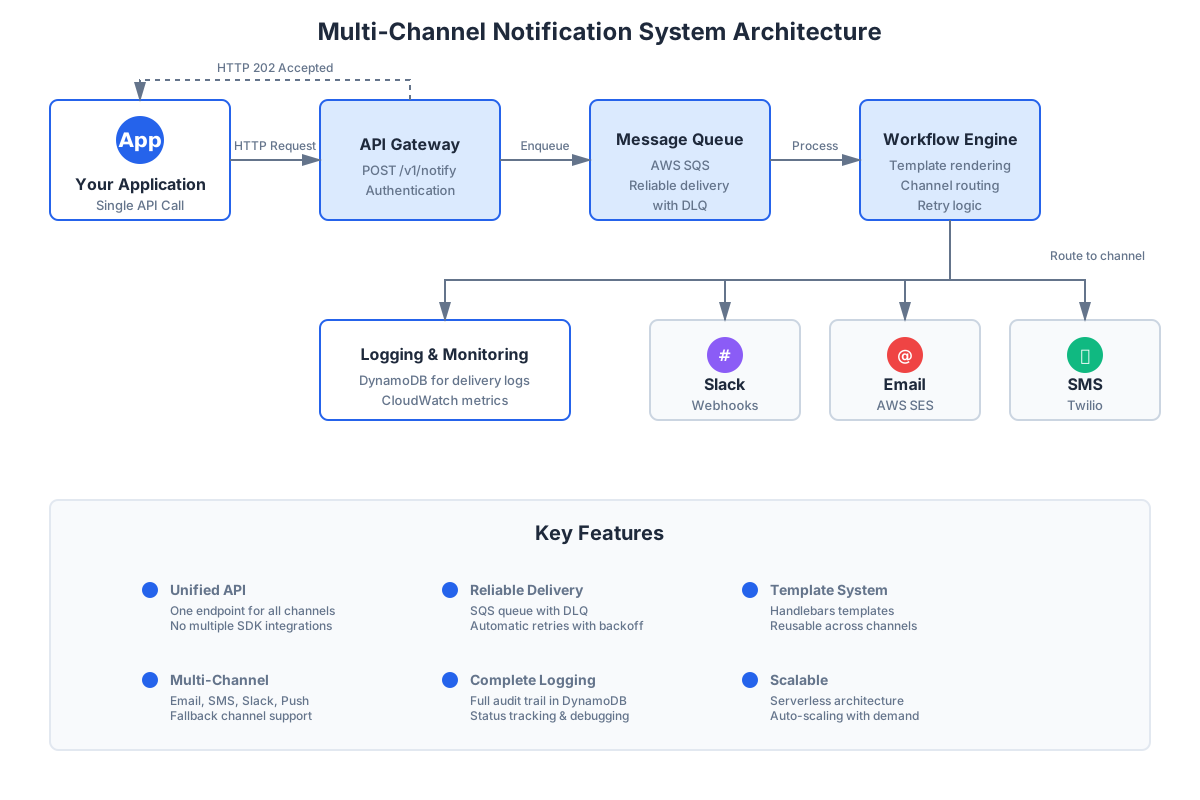 Figure 1: High-level multi-channel notification architecture
What Is a Multi-Channel Notification System?
A multi-channel notification system sends messages across different delivery channels:
- Email (AWS SES, Resend, SendGrid, Mailgun)
- SMS (Twilio, AWS SNS, Vonage)
- Slack (Webhooks, Bot API, Socket Mode)
- Push Notifications (FCM, APNS, Web Push)
- Webhooks (HTTP callbacks to external systems)
- In-App (Real-time UI notifications)
What It Must Handle
A production-ready system isn't just about sending messages. It must handle:
- Intelligent Routing - Direct messages to the right channel based on user preferences
- Channel Selection - Support multiple channels per event
- Template Rendering - Dynamic content with variables
- Fallback Logic - If Slack fails, fall back to Email, then SMS
- Error Handling - Gracefully handle provider failures
- Retry Mechanisms - Exponential backoff for transient failures
- Rate Limiting - Respect provider API limits
- Delivery Guarantees - At-least-once delivery semantics
- Logging & Observability - Track every message through its lifecycle
- User Preferences - Honor opt-outs and channel preferences
Essentially, it ensures that an event is reliably communicated, regardless of the user's preferred channel or provider failures.
The Core Architecture
Below is the standard architecture used by modern SaaS companies like Linear, Stripe, and Vercel.
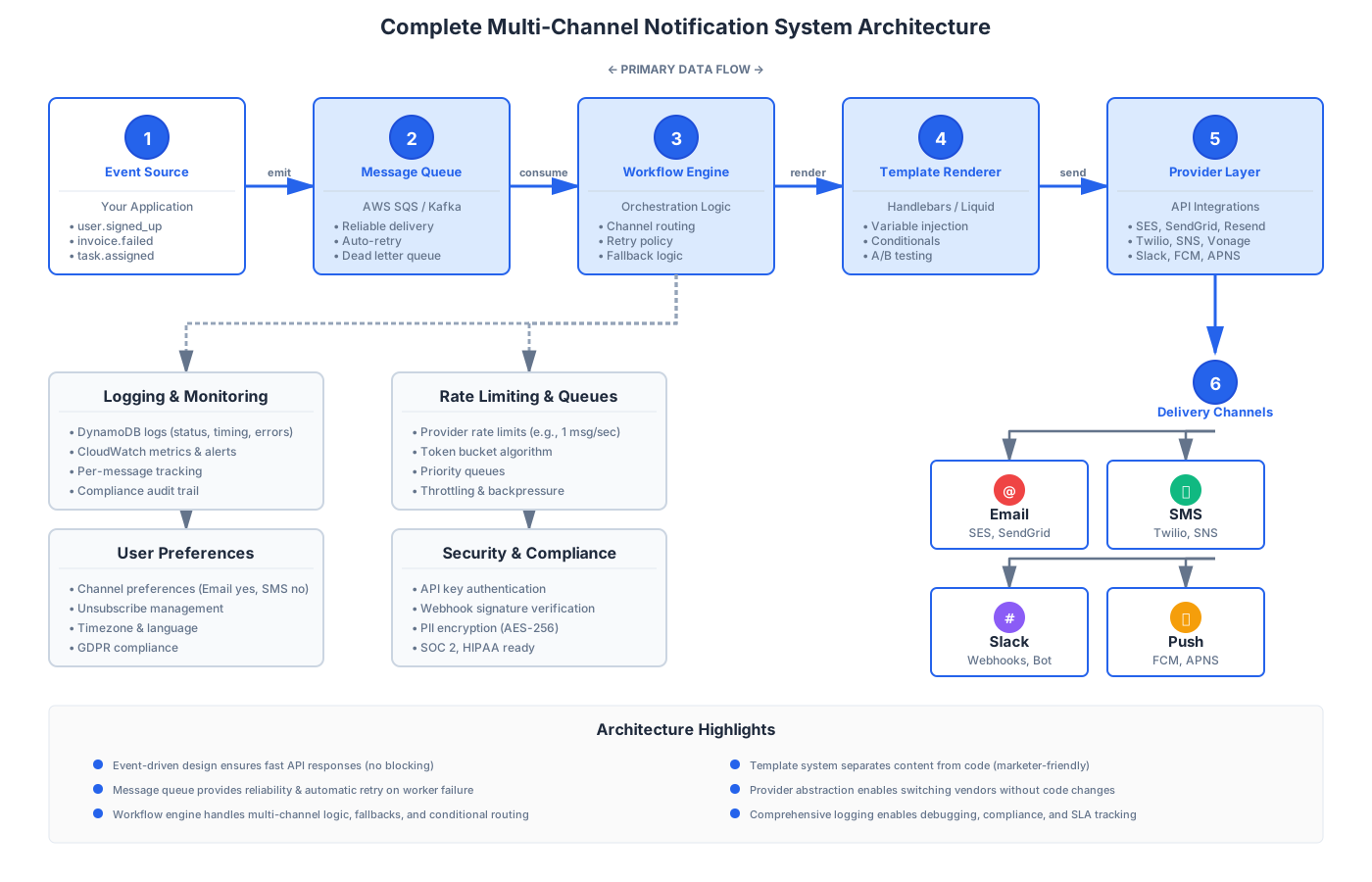 Figure 2: Complete notification system architecture with Event Source → Message Queue → Workflow Engine → Template Renderer → Provider Layer → Channels
1. Event Source
Your application emits events such as:
user.signed_up→ Welcome emailinvoice.failed→ Payment notificationtask.assigned→ Slack messagedeployment.completed→ Webhook callbackpassword.reset→ SMS verification
Critical Rule: These should go to a message queue — never handled inline in your HTTP handlers.
// ❌ WRONG: Blocking HTTP request
app.post('/api/users', async (req, res) => {
  const user = await createUser(req.body)
  await sendWelcomeEmail(user) // Blocks response!
  res.json(user)
})

// ✅ CORRECT: Queue the work
app.post('/api/users', async (req, res) => {
  const user = await createUser(req.body)
  await queue.send({
    type: 'user.signed_up',
    userId: user.id,
  })
  res.json(user) // Fast response
})
2. Message Queue
A queue guarantees reliability and isolates your app from provider failures.
Best options:
- AWS SQS - Managed, scales automatically, $0.40 per million requests
- Apache Kafka - High throughput, persistent, complex setup
- RabbitMQ - Feature-rich, requires management
- Google Cloud Pub/Sub - Global distribution, pay-per-use
- Redis Streams - Simple, fast, but less durable
Why queues matter:
- Decouples event production from consumption
- Provides automatic retry on worker failure
- Enables horizontal scaling of workers
- Buffers traffic spikes
3. Workflow Engine
This is where multi-channel magic happens. The workflow engine orchestrates:
- Primary channel (e.g., Email)
- Fallback channels (e.g., Slack if Email fails)
- Retry policy (exponential backoff)
- Template selection (based on event type)
- Variable injection (user data, timestamps)
- Conditional logic (user preferences, time zones)
Example workflow:
Send Email
  ↓ (if fails after 3 retries)
Send Slack
  ↓ (if fails after 3 retries)
Send SMS
  ↓ (if all fail)
Log to Dead Letter Queue
 Figure 3: Visual workflow builder in NotiGrid dashboard
4. Template Rendering Layer
Templates must be:
- Stored outside the codebase (database or CMS)
- Support variables and conditionals
- Versioned for A/B testing
- Preview-able before sending
Example template:
Hello {{firstName}},

Your invoice for {{amount}} has failed.

{{#if paymentMethod}}
  We attempted to charge your {{paymentMethod}}.
{{/if}}

Please update your payment method:
{{updatePaymentUrl}}

Thanks,
The {{companyName}} Team
5. Provider Layer
Each channel requires provider integrations:
| Channel | Providers | Notes |
|---|---|---|
| AWS SES, Resend, SendGrid, Postmark | Need SPF/DKIM setup | |
| SMS | Twilio, AWS SNS, Vonage, Plivo | Country-specific regulations |
| Slack | Webhooks, Bot API | Workspace permissions required |
| Push | FCM, APNS, OneSignal | Device tokens needed |
| Webhooks | HTTP/HTTPS | Signature verification |
Each provider must implement:
- Request formatting (API-specific)
- Authentication (API keys, OAuth)
- Error handling (rate limits,
4xx,5xx) - Retry logic with backoff
- Logging of requests/responses
6. Logging & Observability
You need per-message tracking of:
- Status -
queued,sent,delivered,failed,retrying - Provider Response - Full API response
- Timing - Enqueued at, sent at, delivered at
- Error Messages - Stack traces, provider errors
- Event History - Every state transition
- User Context - User ID, email, preferences
This becomes critical for:
- Debugging delivery failures
- Compliance audits (GDPR, HIPAA)
- SLA reporting
- Billing/usage tracking
 Figure 4: Real-time notification logs with status indicators
Step-by-Step Implementation Guide
Let's build each component with real code examples.
Step 1: Set Up Your Message Queue
Using AWS SQS with TypeScript:
import { SQSClient, SendMessageCommand } from '@aws-sdk/client-sqs'

const sqsClient = new SQSClient({ region: 'us-east-1' })

export async function queueNotification(event: NotificationEvent) {
  const command = new SendMessageCommand({
    QueueUrl: process.env.NOTIFICATION_QUEUE_URL,
    MessageBody: JSON.stringify(event),
    MessageAttributes: {
      eventType: {
        DataType: 'String',
        StringValue: event.type,
      },
      priority: {
        DataType: 'Number',
        StringValue: event.priority?.toString() || '5',
      },
    },
  })

  await sqsClient.send(command)
}

// Usage
await queueNotification({
  type: 'invoice.failed',
  userId: 'user_123',
  data: {
    amount: 29.00,
    invoiceId: 'inv_456',
  },
})
Dead Letter Queue (DLQ) Setup:
// In your IaC (Terraform, CDK, etc.)
const dlq = new aws.sqs.Queue('notification-dlq', {
  retentionPeriod: 1209600, // 14 days
})

const mainQueue = new aws.sqs.Queue('notification-queue', {
  redrivePolicy: JSON.stringify({
    deadLetterTargetArn: dlq.arn,
    maxReceiveCount: 3, // After 3 failures, move to DLQ
  }),
})
Step 2: Create a Workflow Engine
interface WorkflowStep {
  channel: 'email' | 'sms' | 'slack' | 'push' | 'webhook'
  provider: string
  template: string
  retries: number
  backoff: 'linear' | 'exponential'
  fallbackTo?: WorkflowStep
}

interface Workflow {
  id: string
  name: string
  trigger: string // Event type
  steps: WorkflowStep[]
}

class WorkflowEngine {
  async execute(workflow: Workflow, event: NotificationEvent) {
    let currentStep = workflow.steps[0]

    while (currentStep) {
      try {
        await this.executeStep(currentStep, event)
        break // Success!
      } catch (error) {
        logger.error('Step failed', { step: currentStep, error })

        if (currentStep.fallbackTo) {
          currentStep = currentStep.fallbackTo
        } else {
          throw error // No more fallbacks
        }
      }
    }
  }

  private async executeStep(step: WorkflowStep, event: NotificationEvent) {
    const provider = this.getProvider(step.channel, step.provider)
    const template = await this.loadTemplate(step.template)
    const rendered = this.renderTemplate(template, event.data)

    await this.sendWithRetry(provider, rendered, step.retries, step.backoff)
  }

  private async sendWithRetry(
    provider: Provider,
    message: RenderedMessage,
    maxRetries: number,
    backoff: 'linear' | 'exponential'
  ) {
    for (let attempt = 0; attempt <= maxRetries; attempt++) {
      try {
        return await provider.send(message)
      } catch (error) {
        if (attempt === maxRetries) throw error

        const delay = backoff === 'exponential'
          ? Math.pow(2, attempt) * 1000 // 1s, 2s, 4s, 8s
          : (attempt + 1) * 2000 // 2s, 4s, 6s, 8s

        await sleep(delay)
      }
    }
  }
}
Step 3: Implement Provider Integrations
Email Provider (AWS SES):
import { SESClient, SendEmailCommand } from '@aws-sdk/client-ses'

class SESEmailProvider implements Provider {
  private client = new SESClient({ region: 'us-east-1' })

  async send(message: RenderedMessage) {
    const command = new SendEmailCommand({
      Source: message.from,
      Destination: {
        ToAddresses: [message.to],
      },
      Message: {
        Subject: {
          Data: message.subject,
          Charset: 'UTF-8',
        },
        Body: {
          Html: {
            Data: message.html,
            Charset: 'UTF-8',
          },
        },
      },
    })

    const result = await this.client.send(command)

    return {
      success: true,
      messageId: result.MessageId,
      provider: 'aws-ses',
    }
  }
}
SMS Provider (Twilio):
import twilio from 'twilio'

class TwilioSMSProvider implements Provider {
  private client = twilio(
    process.env.TWILIO_ACCOUNT_SID,
    process.env.TWILIO_AUTH_TOKEN
  )

  async send(message: RenderedMessage) {
    const result = await this.client.messages.create({
      body: message.text,
      from: process.env.TWILIO_PHONE_NUMBER,
      to: message.to,
    })

    return {
      success: result.status !== 'failed',
      messageId: result.sid,
      provider: 'twilio',
      status: result.status,
    }
  }
}
Slack Provider (Webhooks):
class SlackWebhookProvider implements Provider {
  async send(message: RenderedMessage) {
    const response = await fetch(message.webhookUrl, {
      method: 'POST',
      headers: {
        'Content-Type': 'application/json',
      },
      body: JSON.stringify({
        text: message.text,
        blocks: message.blocks, // Rich formatting
      }),
    })

    if (!response.ok) {
      throw new Error(`Slack API error: ${response.statusText}`)
    }

    return {
      success: true,
      messageId: response.headers.get('x-slack-req-id'),
      provider: 'slack',
    }
  }
}
Step 4: Add Retry Logic with Exponential Backoff
async function sendWithExponentialBackoff<T>(
  fn: () => Promise<T>,
  maxRetries: number = 5,
  initialDelay: number = 1000
): Promise<T> {
  let lastError: Error

  for (let attempt = 0; attempt <= maxRetries; attempt++) {
    try {
      return await fn()
    } catch (error) {
      lastError = error as Error

      // Check if error is retryable
      if (!isRetryableError(error)) {
        throw error
      }

      if (attempt === maxRetries) {
        throw new Error(
          `Max retries (${maxRetries}) exceeded. Last error: ${lastError.message}`
        )
      }

      // Exponential backoff with jitter
      const delay = Math.min(
        initialDelay * Math.pow(2, attempt) + Math.random() * 1000,
        30000 // Max 30 seconds
      )

      logger.warn(`Attempt ${attempt + 1} failed, retrying in ${delay}ms`, {
        error: lastError.message,
      })

      await sleep(delay)
    }
  }

  throw lastError!
}

function isRetryableError(error: any): boolean {
  // Retry on network errors
  if (error.code === 'ECONNRESET' || error.code === 'ETIMEDOUT') {
    return true
  }

  // Retry on 5xx server errors
  if (error.statusCode >= 500 && error.statusCode < 600) {
    return true
  }

  // Retry on rate limits
  if (error.statusCode === 429) {
    return true
  }

  // Don't retry on 4xx client errors (except 429)
  return false
}
Step 5: Build Template System
import Handlebars from 'handlebars'

interface Template {
  id: string
  name: string
  subject?: string // For email
  body: string
  channel: string
  variables: string[] // e.g., ['firstName', 'amount']
}

class TemplateRenderer {
  private cache = new Map<string, HandlebarsTemplateDelegate>()

  async render(templateId: string, variables: Record<string, any>) {
    const template = await this.loadTemplate(templateId)
    const compiled = this.getCompiled(template)

    // Add helper functions
    Handlebars.registerHelper('formatCurrency', (amount: number) => {
      return new Intl.NumberFormat('en-US', {
        style: 'currency',
        currency: 'USD',
      }).format(amount)
    })

    Handlebars.registerHelper('formatDate', (date: string) => {
      return new Date(date).toLocaleDateString()
    })

    return {
      subject: template.subject ? compiled(variables) : undefined,
      body: compiled(variables),
    }
  }

  private getCompiled(template: Template): HandlebarsTemplateDelegate {
    if (!this.cache.has(template.id)) {
      this.cache.set(template.id, Handlebars.compile(template.body))
    }
    return this.cache.get(template.id)!
  }

  private async loadTemplate(templateId: string): Promise<Template> {
    // Load from database
    return await db.templates.findById(templateId)
  }
}
Step 6: Add Logging & Monitoring
interface NotificationLog {
id: string
eventId: string
userId: string
channel: string
provider: string
status: 'queued' | 'sent' | 'delivered' | 'failed' | 'retrying'
attempts: number
sentAt?: Date
deliveredAt?: Date
failedAt?: Date
error?: string
providerResponse?: any
metadata: Record<string, any>
}
class NotificationLogger {
async log(event: Partial<NotificationLog>) {
// Store in database
await db.notificationLogs.create(event)
// Send to monitoring (Datadog, New Relic, etc.)
metrics.increment('notification.sent', {
channel: event.channel,
provider: event.provider,
status: event.status,
})
// If failed, alert
if (event.status === 'failed') {
await this.alertOnFailure(event)
}
}
async alertOnFailure(log: Partial<NotificationLog>) {
// High-priority notifications should alert immediately
if (log.metadata?.priority === 'high') {
await sendSlackAlert({
text: `🚨 High-priority notification failed`,
details: log,
})
}
// Track failure rate
const recentFailures = await this.getRecentFailures(
log.provider!,
5 // minutes
)
if (recentFailures > 10) {
await sendPagerDutyAlert({
title: `${log.provider} notification provider failing`,
severity: 'error',
})
}
}
}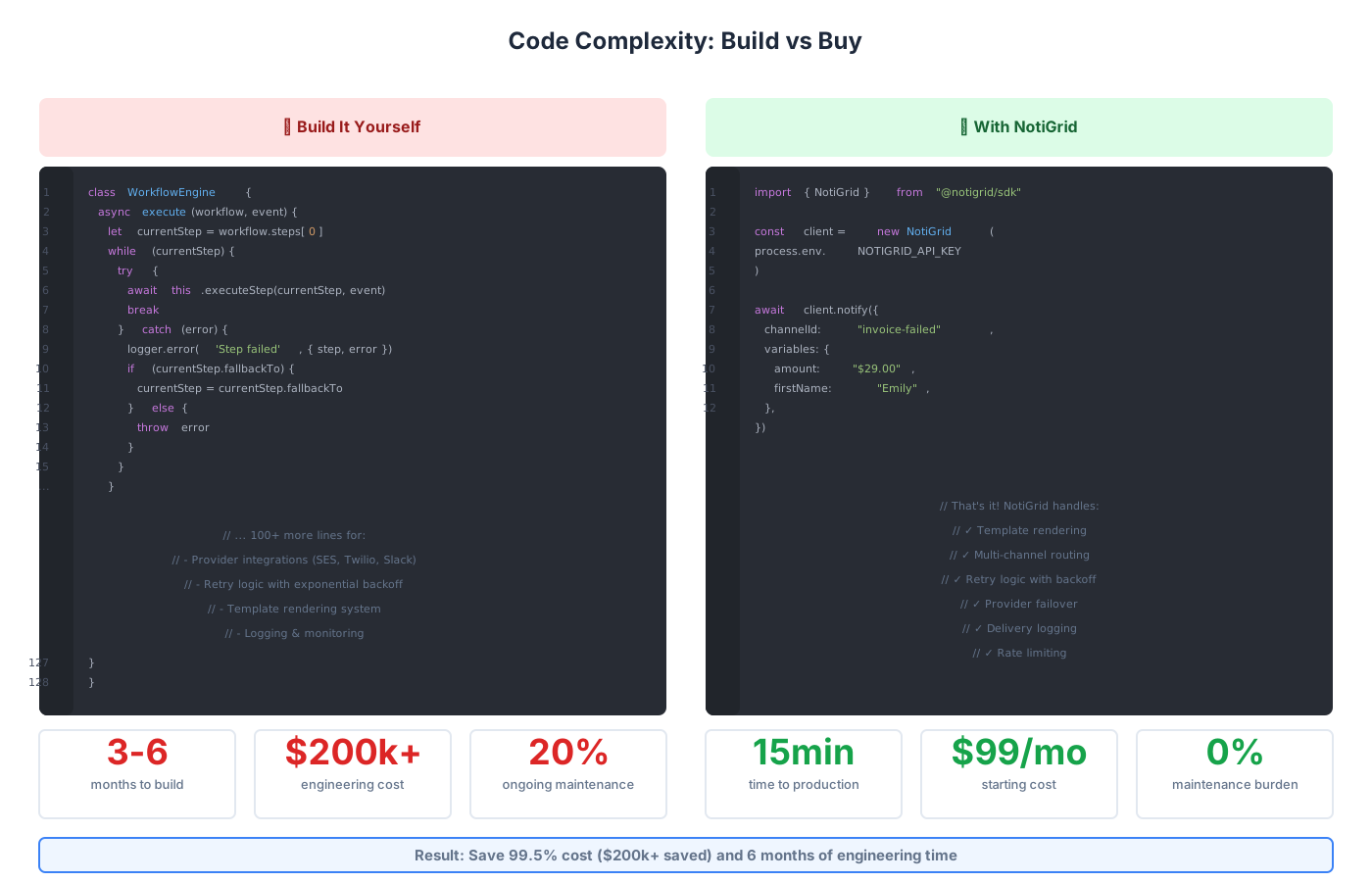 Figure 5: Code complexity comparison - Building yourself requires 128+ lines vs NotiGrid's simple 12-line integration
The Hidden Costs of Building In-House
Building a simple "send an email" function takes a few hours.
Building a production-grade multi-channel notification system with all the features above requires 3-6 months of engineering time.
Real Cost Breakdown
| Item | Cost | Notes |
|---|---|---|
| Engineering Time | $150k-$300k | 3-6 months at $100k-$200k/year |
| Infrastructure | $500-$2k/mo | Queues, databases, workers |
| Provider Costs | $100-$1k/mo | Email, SMS, etc. |
| Maintenance | 20% annually | Bug fixes, updates, scaling |
| Monitoring Tools | $200-$500/mo | Datadog, Sentry, PagerDuty |
| Total Year One | $200k-$400k | Not including opportunity cost |
With NotiGrid
- Setup Time: 15 minutes
- Engineering Cost: $0
- Monthly Cost: Starting at $99/month
- Maintenance: $0 (fully managed)
- Year One Cost: $1,188
Savings: 99.5% (or $200k-$400k saved)
Build vs Buy: Decision Matrix
| Factor | Build Yourself | Use NotiGrid |
|---|---|---|
| Time to Production | 3-6 months | 15 minutes |
| Initial Cost | $150k-$300k | $0 |
| Monthly Cost | $1k-$3k | $99-$499 |
| Maintenance Burden | High (20% time) | None |
| Feature Updates | Requires dev time | Automatic |
| Scaling Complexity | Manual | Automatic |
| Reliability | Your responsibility | 99.9% SLA |
| Provider Integrations | Build each | 15+ included |
| Support | DIY | 24/7 support |
| Best For | Highly custom needs | 95% of use cases |
When to Build Yourself
Build in-house only if you have:
- Extreme customization requirements that no SaaS can meet
- Regulatory constraints preventing use of external services
- Unlimited engineering resources and time
- Notifications are your core product differentiator
When to Use NotiGrid
Use NotiGrid when:
- You need to ship fast and focus on your product
- Notifications aren't your core product
- You want 99.9% reliability without the engineering effort
- You need multiple channels and providers
- Your team is small to medium (
<50engineers) - You want to avoid maintenance burden
Example: How NotiGrid Simplifies Everything
Instead of building thousands of lines of code above, with NotiGrid you get:
1. Configure Workflow (Visual UI - No Code)
2. Send Notification (3 Lines of Code)
For a complete step-by-step guide on integrating the NotiGrid SDK, see our API Integration Guide.
import { NotiGrid } from "@notigrid/sdk"

const client = new NotiGrid(process.env.NOTIGRID_API_KEY)

await client.notify({
  channelId: "invoice-failed",
  variables: {
    amount: "$29.00",
    firstName: "Emily",
    invoiceId: "inv_456",
  },
  to: {
    email: "emily@example.com",
    slack: "https://hooks.slack.com/...",
    sms: "+1234567890",
  },
})
3. View Real-Time Logs (Dashboard)
Behind the scenes, NotiGrid automatically handles:
- Template rendering with variables
- Channel selection based on user preferences
- Retry logic with exponential backoff
- Provider failover if one fails
- Comprehensive logging of all attempts
- Delivery status tracking
- Rate limiting across providers
- Error monitoring and alerts
7 Common Pitfalls to Avoid
1. Sending Notifications Synchronously
Problem: Blocking HTTP requests waiting for email/SMS delivery
Impact: Slow API responses, timeouts, poor user experience
Solution: Always use message queues
// ❌ BAD - User waits for email
app.post('/api/order', async (req, res) => {
  const order = await createOrder(req.body)
  await sendOrderConfirmation(order) // Blocks 1-3 seconds!
  res.json(order)
})

// ✅ GOOD - Instant response
app.post('/api/order', async (req, res) => {
  const order = await createOrder(req.body)
  await queue.publish('order.created', order) // ~10ms
  res.json(order) // Fast response
})
2. Not Implementing Retries
Problem: Single transient network error = lost notification
Impact: Customers miss critical alerts
Solution: Exponential backoff with max attempts
3. Hard-Coding Message Templates
Problem: Every text change requires code deployment
Impact: Slow iteration, engineering bottleneck
Solution: Store templates in database with versioning
4. No Fallback Channels
Problem: If primary channel fails, user gets nothing
Impact: Poor reliability, missed critical alerts
Solution: Define fallback chains (Email → Slack → SMS)
5. Insufficient Logging
Problem: Unable to debug "why didn't user get the notification?"
Impact: Support burden, compliance issues
Solution: Log every attempt with full context and errors
6. Ignoring Rate Limits
Problem: Getting blocked by provider (Twilio 1 msg/sec, SendGrid limits)
Impact: Messages rejected, service disruption
Solution: Implement token bucket or leaky bucket rate limiting
7. Not Handling Provider Failures
Problem: Single provider outage breaks all notifications
Impact: Complete system failure
Solution: Multi-provider setup with automatic failover
Troubleshooting Common Issues
Issue: Emails Going to Spam
Causes:
- Missing SPF/DKIM/DMARC records
- Poor sender reputation (new domain/IP)
- Spam trigger words in content
- No unsubscribe link
- High bounce/complaint rates
Solutions:
- Set up SPF, DKIM, and DMARC records properly
- Warm up new IP addresses gradually (increase volume over weeks)
- Use established email providers with good reputation
- Always include unsubscribe links (legally required)
- Monitor bounce and complaint rates (keep under 0.1%)
- Use email validation before sending
Issue: Slack Messages Not Sending
Causes:
- Invalid or expired webhook URL
- Rate limiting (1 message per second per webhook)
- Workspace permissions revoked
- Webhook deleted by admin
Solutions:
- Validate webhooks before saving to database
- Implement per-webhook rate limiting
- Handle 410 Gone response (webhook revoked)
- Use Slack Bot API for better reliability and control
- Test webhooks periodically with health checks
Issue: SMS Delivery Failures
Causes:
- Invalid phone number format
- Country/region restrictions
- Carrier blocks (spam filters)
- Insufficient Twilio balance
- Wrong phone number type (landline vs mobile)
Solutions:
- Validate phone numbers using libphonenumber
- Check Twilio country permissions and enable required countries
- Monitor carrier feedback loops
- Set up low-balance alerts ($20 threshold)
- Use Twilio Lookup API to verify numbers
- Implement phone number normalization
Issue: High Notification Latency
Causes:
- Synchronous processing in HTTP handlers
- No database connection pooling
- Sequential channel sending
- Template compilation on every send
- Cold starts in serverless functions
Solutions:
- Use queues and background workers
- Pool database and HTTP connections
- Send to multiple channels in parallel
- Pre-compile and cache templates
- Keep workers warm (scheduled pings)
- Optimize queue polling interval
Issue: Duplicate Notifications
Causes:
- Retry logic without idempotency
- Queue visibility timeout too short
- Multiple workers processing same message
- Database race conditions
Solutions:
- Implement idempotency keys (message deduplication)
- Set appropriate visibility timeouts (2x expected processing time)
- Use SQS FIFO queues for critical messages
- Add unique constraints on notification logs
- Check "already sent" before sending
Best Practices Summary
Architecture
- Always use message queues - Never send inline in HTTP handlers
- Implement dead letter queues - Catch persistent failures for analysis
- Design for idempotency - Handle duplicate message delivery safely
- Use circuit breakers - Prevent cascading failures from bad providers
Reliability
- Retry with exponential backoff - Handle transient failures gracefully
- Set reasonable timeouts - Don't wait forever (5-10 seconds max)
- Implement fallback channels - If Email fails, try Slack
- Monitor delivery rates - Alert on unusual failure spikes (
>5%)
Operations
- Log everything - Per-message tracking is critical for debugging
- Separate templates from code - Enable marketing team to edit
- Version your templates - Support A/B testing and rollback
- Honor user preferences - Let users choose their channels
Security
- Validate webhook signatures - Prevent replay attacks
- Encrypt sensitive data - PII in logs and databases (GDPR)
- Implement rate limiting - Prevent abuse and DOS
- Maintain audit trails - Required for compliance (HIPAA, SOC 2)
Frequently Asked Questions
How long does it take to build a notification system from scratch?
A basic single-channel system can be built in 1-2 weeks. A production-ready multi-channel system with proper error handling, retries, templates, logging, and monitoring typically takes 3-6 months of full-time engineering work.
What's the real cost of building vs buying?
Building in-house costs $200k-$400k in the first year (engineering salary + infrastructure). Using NotiGrid costs $1,188/year for the starter plan, representing a 99.5% cost reduction. Plus, you get to market 6 months faster.
Which notification providers does NotiGrid support?
NotiGrid supports 15+ providers out of the box:
- Email: AWS SES, SendGrid, Resend, Postmark, Mailgun
- SMS: Twilio, AWS SNS, Vonage, Plivo
- Slack: Webhooks, Bot API, Socket Mode
- Push: Firebase (FCM), Apple (APNS), Web Push
- Webhooks: Any HTTP/HTTPS endpoint
New providers added monthly based on customer requests.
Can I migrate from my existing notification system?
Yes. NotiGrid provides:
- Template import tools
- Provider migration guides
- API compatibility layer
- Gradual migration support (run both systems in parallel)
- Free migration consulting for Enterprise customers
Most customers complete migration in 1-2 weeks with zero downtime.
How does NotiGrid handle retries and failures?
NotiGrid automatically:
- Retries failed messages with exponential backoff (up to 5 attempts)
- Falls back to alternative channels if configured
- Moves persistently failed messages to dead letter queue
- Alerts your team via Slack/email for repeated failures
- Provides detailed error logs and debugging info
What happens if a provider goes down?
NotiGrid can:
- Automatically failover to backup providers (SendGrid → SES)
- Queue messages until provider recovers
- Alert your team immediately about outages
- Switch providers without code changes
Uptime SLA: 99.9% (less than 9 hours downtime per year)
How do I handle user unsubscribe preferences?
NotiGrid provides:
- Built-in unsubscribe link generation
- User preference management API
- Hosted preference center (optional)
- Automatic suppression of opted-out users
- Channel-specific preferences ("Email yes, SMS no")
- Compliance with CAN-SPAM, GDPR
Is NotiGrid GDPR/HIPAA compliant?
Yes. NotiGrid is:
- GDPR compliant - DPA available, data deletion, export
- SOC 2 Type II certified - Annual security audit
- HIPAA ready - BAA available for Enterprise plans
- CCPA compliant - California privacy regulations
All data encrypted at rest and in transit (AES-256, TLS 1.3).
How does pricing work?
NotiGrid pricing based on:
- Monthly notifications sent
- Number of team members
- Support level
Plans:
- Starter: $99/mo for 10,000 notifications
- Growth: $299/mo for 100,000 notifications
- Enterprise: Custom for 1M+ notifications
All plans include unlimited channels, providers, and templates.
Can I use my own email/SMS providers?
Yes! NotiGrid supports:
- Bring your own API keys (use your SES, Twilio accounts)
- Billing goes directly to your providers
- NotiGrid handles orchestration and logic only
- Unified API and logs across all providers
How quickly can I get started?
Most customers send their first notification within 15 minutes:
- Sign up (2 minutes)
- Connect a provider (3 minutes)
- Create a template (5 minutes)
- Send test notification (2 minutes)
- Integrate SDK into your app (3 minutes)
Our quickstart guide walks you through each step.
Does NotiGrid support webhooks for delivery status?
Yes! NotiGrid can send webhooks for:
- Message delivered
- Message failed
- User unsubscribed
- Bounce detected
- Complaint received
Configure webhooks per channel with signature verification included.
Next Steps
Ready to Build Your Notification System?
Option 1: Try NotiGrid (Recommended for 95% of teams)
Get started in 15 minutes:
- Sign up for free trial → No credit card required
- Follow the API Integration Guide →
- Send your first notification
- Invite your team
Benefits:
- Production-ready in minutes, not months
- 99.9% uptime SLA with monitoring
- Save $200k+ in engineering costs
- Free migration support from existing systems
- 24/7 support team
Option 2: Build It Yourself
If you decide to build in-house:
- Bookmark this guide as your architecture reference
- Download our open-source notification worker template →
- Budget 3-6 months and $200k-$400k
- Email us at support@notigrid.com for architecture advice
We're always happy to advise on architecture — even if you don't use NotiGrid. We want developers to have access to great notification infrastructure.
Additional Resources
- NotiGrid Documentation →
- API Reference →
- SDK Documentation →
- Migration Guides →
- Architecture Deep Dive →
- Provider Comparison Guide →
Conclusion
Building a multi-channel notification system is deceptively complex. What starts as "just send an email" quickly becomes a distributed systems challenge involving queues, retries, providers, templates, logging, observability, and operational excellence.
Most companies underestimate the complexity and end up with:
- Unreliable delivery (messages lost during failures)
- No visibility into problems (why didn't the user get it?)
- Maintenance burden (oncall for notification failures)
- Scaling issues (rate limits, performance)
- 6+ months of valuable engineering time
- $200k-$400k in actual costs
The architecture matters. Whether you build or buy, make sure your system has:
- ✅ Message queues for reliability and scale
- ✅ Retry logic with exponential backoff
- ✅ Fallback channels for resilience
- ✅ Comprehensive logging and observability
- ✅ Template management system
- ✅ Multi-provider support with failover
- ✅ User preference management
- ✅ Rate limiting and error handling
- ✅ Security and compliance features
NotiGrid provides all of this out of the box, fully managed and battle-tested, so your team can focus on building your core product instead of reinventing notification infrastructure.
The choice is yours: spend 6 months and $300k building, or 15 minutes getting started with NotiGrid.
Have questions? Email us at support@notigrid.com or book a demo.
Want to see NotiGrid in action? Book a demo → or start your free trial →
Ready to send your first notification?
Get started with NotiGrid today and send notifications across email, SMS, Slack, and more.