

Introduction
Modern applications send billions of notifications daily. From password resets and order confirmations to security alerts and marketing campaigns, notifications are the primary communication channel between products and users.
But here's the challenge: as soon as you need to scale beyond a single email provider or add SMS, push notifications, or Slack alerts, complexity explodes. You're suddenly managing multiple vendor APIs, building retry logic, handling deliverability issues, and maintaining templates across different channels.
This is where notification infrastructure becomes critical.
Companies like Stripe, Linear, and GitHub invest millions building robust notification infrastructure. But in 2025, you don't have to. This guide explains what notification infrastructure is, why it matters, and how platforms like NotiGrid make it accessible to any team.
What Is Notification Infrastructure?
Notification infrastructure is a comprehensive system responsible for reliably delivering messages across multiple channels—email, SMS, push notifications, Slack, webhooks—at scale.
Think of it as the complete backend pipeline that takes a notification request from your application and ensures it reaches the right user through the right channel at the right time.
Quick Definition
Notification infrastructure handles message formatting, channel selection, provider routing, delivery guarantees, retries, error handling, logging, template management, user preferences, and rate limiting for multi-channel notification delivery.
What It Includes
A complete notification infrastructure system encompasses:
Message Processing:
- Event ingestion and validation
- Message queue management
- Template rendering with variables
- Personalization and localization
Delivery Management:
- Multi-channel routing (Email, SMS, Push, Slack, Webhooks)
- Provider abstraction and failover
- Retry logic with exponential backoff
- Dead letter queue (DLQ) handling
User Management:
- Preference management (channel opt-in/opt-out)
- Unsubscribe handling
- Timezone-aware delivery
- Do-not-disturb rules
Observability:
- Real-time delivery tracking
- Comprehensive logging (who, what, when, status)
- Metrics and analytics
- Debugging and audit trails
Reliability:
- Rate limiting and throttling
- Circuit breakers for failing providers
- Fallback channels
- Guaranteed delivery with SLA tracking
Core Components of Notification Infrastructure
Let's break down the key architectural components:
1. Event Source & API Gateway
Your application triggers notifications through a unified API:
await notigrid.notify({
  channelId: "invoice-failed",
  variables: {
    userName: "Sarah",
    amount: "$49.99",
    retryUrl: "https://app.example.com/billing"
  },
  to: "sarah@example.com"
})
The API gateway authenticates requests, validates payloads, and immediately queues the message.
2. Message Queue
A reliable message queue (AWS SQS, RabbitMQ, or Kafka) ensures:
- Asynchronous processing - Your API responds instantly (HTTP 202 Accepted)
- Durability - Messages aren't lost if workers crash
- Scalability - Handle traffic spikes without dropping messages
- Retry semantics - Failed messages automatically retry
3. Workflow Engine
The workflow engine orchestrates notification delivery:
- Determines which channel(s) to use based on rules
- Handles fallback logic (Email → SMS if email fails)
- Manages conditional delivery (only send if user opted-in)
- Enforces delivery windows (don't send SMS at 2am)
4. Template Renderer
Templates separate content from code:
Hi {{userName}},

Your payment of {{amount}} failed. Please update your billing information:

{{retryUrl}}

Thanks,
The {{companyName}} Team
The renderer:
- Injects dynamic variables
- Supports conditionals and loops
- Handles multi-language templates
- A/B tests different messaging
5. Provider Layer
Abstracts integration with delivery providers:
- Email: AWS SES, SendGrid, Resend, Postmark
- SMS: Twilio, AWS SNS, Vonage
- Push: Firebase Cloud Messaging (FCM), Apple Push Notification Service (APNS)
- Slack: Webhook API, Bot API
- Webhooks: Custom HTTP endpoints
The provider layer handles:
- Authentication and API calls
- Rate limiting per provider
- Automatic failover (SendGrid down? Switch to AWS SES)
- Provider-specific formatting
6. Delivery Channels
Final message delivery through:
- Email - Transactional and marketing emails
- SMS - Text messages for urgent alerts
- Push - Mobile and browser notifications
- Slack - Team collaboration alerts
- Webhooks - Custom integrations (CRMs, internal tools)
7. Logging & Monitoring
Every notification is logged:
- Delivery status (queued, sent, delivered, failed, bounced)
- Timestamps for each state transition
- Provider responses and error codes
- Full audit trail for compliance
Why Notification Infrastructure Matters
1. Reliability at Scale
The Challenge: Sending 1,000 emails is easy. Sending 10 million daily while maintaining 99.9% deliverability is hard.
What You Need:
- Distributed queue systems
- Automatic retries with exponential backoff
- Dead letter queues for failed messages
- Circuit breakers to handle provider outages
- Multi-provider failover
Real Impact: A single dropped password reset email can cost a customer. At scale, 0.1% failure rate = thousands of angry users.
2. Multi-Channel Delivery
The Challenge: Users expect notifications across multiple channels:
- Email for detailed updates
- SMS for urgent alerts
- Push notifications for real-time events
- Slack for team collaboration
- Webhooks for integrations
What You Need:
- Unified API across all channels
- Channel-specific formatting and best practices
- User preference management per channel
- Fallback strategies (Email → SMS if critical)
Real Impact: Companies using multi-channel notifications see 3-5x higher engagement rates compared to email-only.
3. Developer Productivity
The Challenge: Building and maintaining notification code is time-consuming:
- Integrating 5 different provider SDKs
- Building retry logic for each channel
- Maintaining templates across channels
- Debugging delivery issues
- Handling provider API changes
What You Need:
- Single API for all notifications
- Reusable templates with version control
- Centralized logging and debugging
- Provider abstraction (switch vendors without code changes)
Real Impact: Teams building notification infrastructure in-house typically spend 3-6 months and $200,000+ in engineering time.
4. Compliance & Security
The Challenge: Notifications involve sensitive user data and strict regulations:
- GDPR (Europe), CAN-SPAM (US), CASL (Canada)
- Unsubscribe requirements
- Data encryption and PII protection
- Audit trails for compliance
What You Need:
- Automatic unsubscribe handling
- Encryption at rest and in transit
- Comprehensive audit logs
- SOC 2 / HIPAA compliance
5. Cost Efficiency
The Challenge: Notification costs add up quickly:
- Email: $0.10 per 1,000 emails
- SMS: $0.0075 per message
- Push: ~$1 per 1,000 notifications
- Infrastructure & engineering overhead
What You Need:
- Multi-provider support for better pricing
- Rate limiting to prevent runaway costs
- Usage analytics to optimize spend
- Batching and deduplication
Real Impact: Smart provider routing can reduce notification costs by 30-50%.
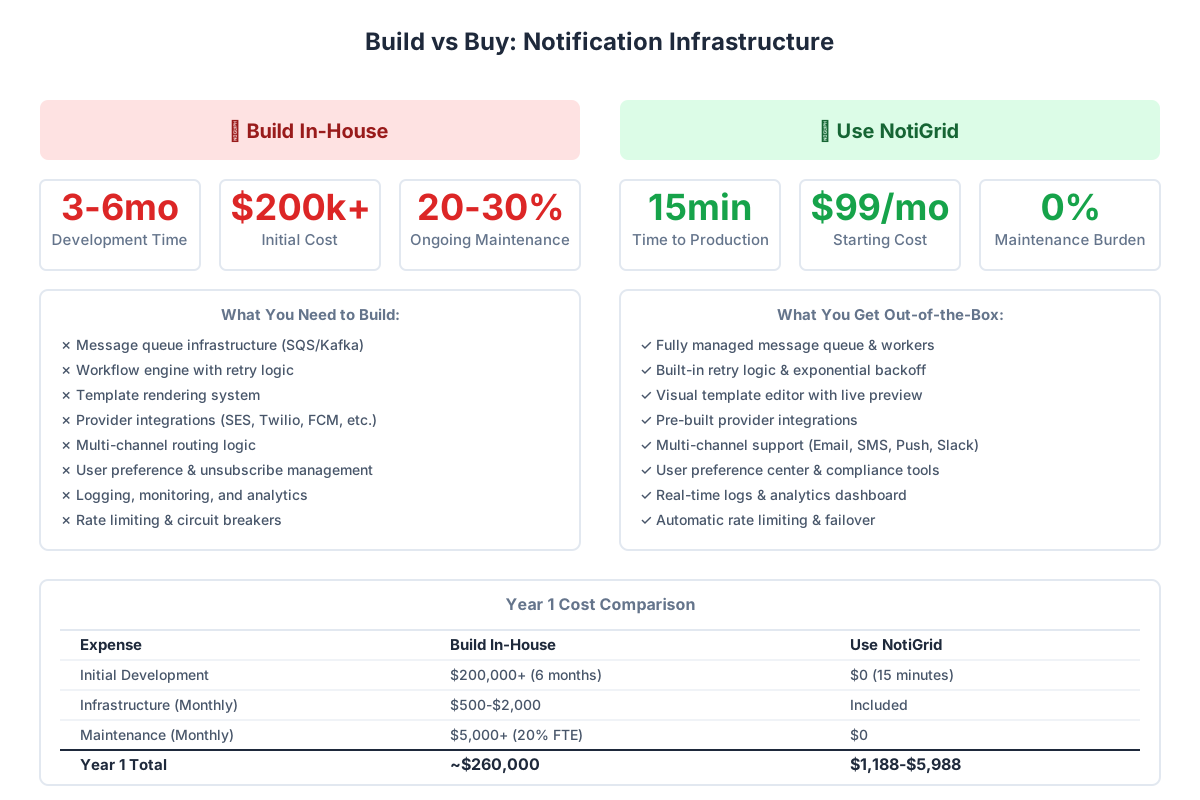
Build vs Buy: Should You Build Your Own Notification Infrastructure?
This is the critical question every team faces. Let's analyze both paths.
Building In-House
Pros:
- Full control over features and architecture
- No vendor lock-in
- Custom integrations tailored to your needs
- No per-message fees (only infrastructure costs)
Cons:
- Time: 3-6 months minimum for basic system
- Cost: $150,000-$300,000 in engineering time
- Maintenance: 20-30% ongoing engineering overhead
- Expertise: Requires distributed systems knowledge
- Complexity: Managing queues, retries, monitoring, providers
- Opportunity cost: Not building core product features
Best For:
- Companies with $100M+ ARR
- Unique requirements no platform can handle
- Teams with dedicated infrastructure engineers
- Extremely high-volume senders (100M+ notifications/month)
Using a Notification Platform (like NotiGrid)
Pros:
- Time to production: 15 minutes to first notification
- Cost: $99-$499/month (vs $200K+ to build)
- Zero maintenance: Platform handles updates, scaling, monitoring
- Best practices: Built-in retry logic, rate limiting, templates
- Multi-channel: Email, SMS, Push, Slack, Webhooks out-of-box
- Reliability: 99.9% uptime SLA
Cons:
- Per-message costs at high volume
- Less customization than building in-house
- Vendor dependency
Best For:
- Startups and scale-ups
- Teams focused on core product
- Companies sending <10M notifications/month
- Rapid iteration and time-to-market priorities
Cost Comparison
| Aspect | Build In-House | Use NotiGrid |
|---|---|---|
| Initial Development | $200,000+ (6 months) | $0 (15 minutes) |
| Monthly Infrastructure | $500-$2,000 | Included in platform fee |
| Engineering Maintenance | $5,000+/month (20% FTE) | $0 |
| Multi-channel Support | 6-12 months additional | Day 1 |
| Total Year 1 Cost | ~$260,000 | $1,188-$5,988 |
Verdict: Unless you're sending 100M+ notifications monthly, platforms like NotiGrid provide 50-100x better ROI.
Architecture Overview
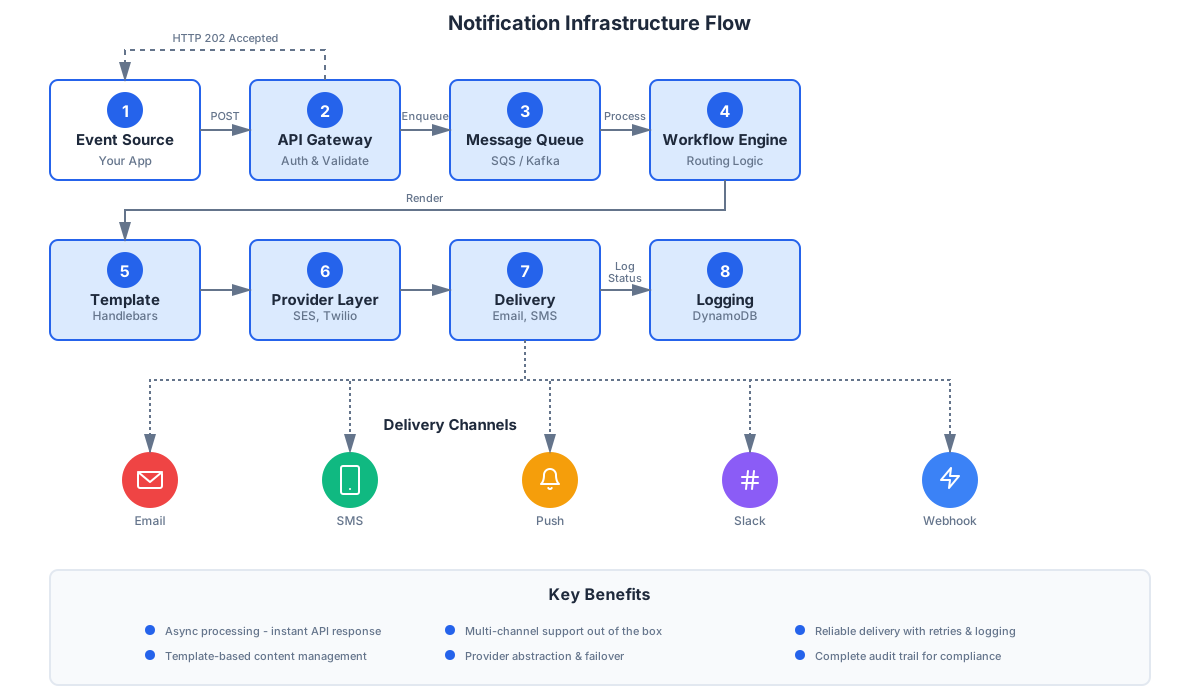
A robust notification infrastructure follows this flow:
High-Level Architecture
- Event Source → Your application triggers a notification
- API Gateway → Authenticates and validates the request
- Message Queue → Durably stores the notification request
- Workflow Engine → Determines routing and applies business logic
- Template Renderer → Renders the message with user-specific variables
- Provider Layer → Sends to appropriate delivery provider
- Delivery Channel → Final delivery (Email, SMS, Push, etc.)
- Logging & Monitoring → Tracks delivery status and metrics
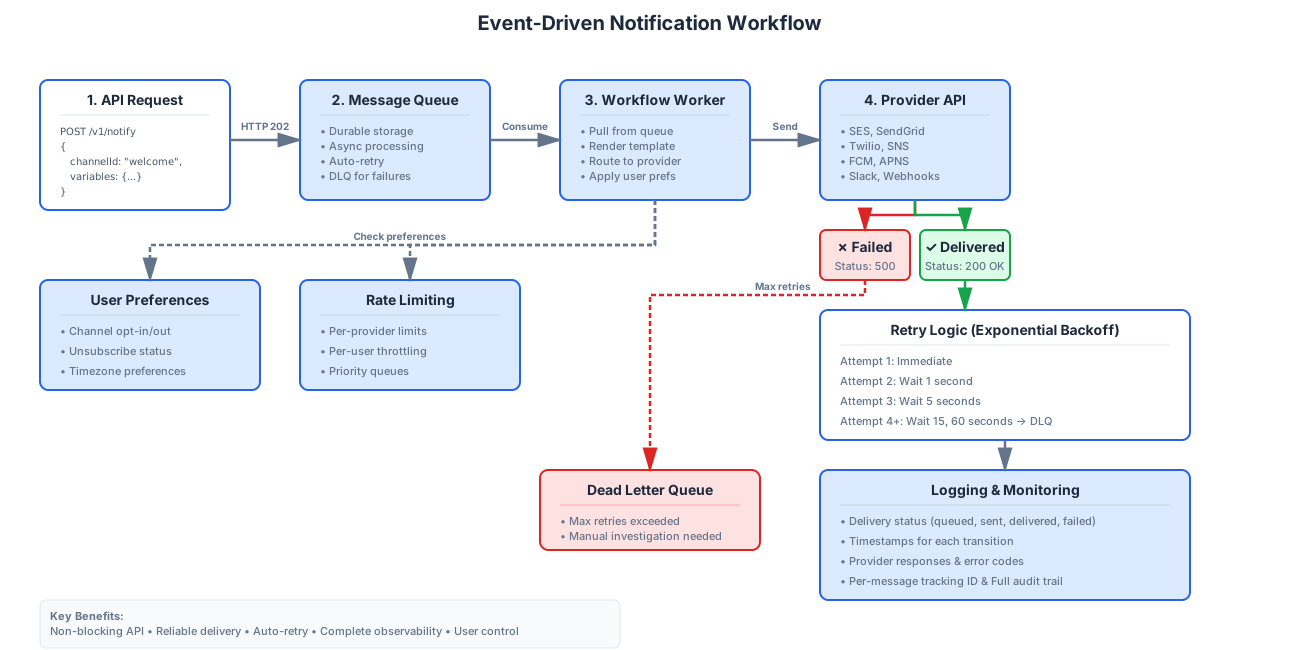
Event-Driven Design
Modern notification infrastructure uses event-driven architecture:
Benefits:
- Non-blocking - API returns instantly (no waiting for email to send)
- Scalable - Queue absorbs traffic spikes
- Resilient - Messages survive worker crashes
- Decoupled - Add new channels without changing core code
Technologies:
- AWS SQS - Managed queue service
- Kafka - High-throughput event streaming
- RabbitMQ - Flexible message broker
Provider Abstraction Layer
Never couple your code directly to a provider's API:
// Bad - tightly coupled to SendGrid
import sgMail from '@sendgrid/mail'
await sgMail.send({ to, from, subject, text })

// Good - abstracted through notification infrastructure
await notigrid.notify({
  channelId: 'welcome-email',
  variables: { userName },
  to
})
Why it matters:
- Switch providers without code changes
- Automatic failover if provider is down
- A/B test different providers
- Negotiate better pricing
Key Features to Look For
When evaluating notification infrastructure (build or buy), these features are essential:
1. Multi-Channel Support
Must-have channels:
- Email (transactional and marketing)
- SMS (time-sensitive alerts)
- Push notifications (mobile and web)
- Slack (team collaboration)
- Webhooks (custom integrations)
2. Template Management
Requirements:
- Version control for templates
- Variable injection (Handlebars, Liquid)
- Preview and testing tools
- Multi-language support
- A/B testing capabilities
3. Retry Logic & Fallbacks
Essential features:
- Exponential backoff (1s → 5s → 15s → 60s)
- Dead letter queue for persistent failures
- Fallback channels (Email fails → send SMS)
- Circuit breakers for provider outages
4. Real-Time Logs & Analytics
Key capabilities:
- Per-message tracking (queued → sent → delivered)
- Delivery rates by channel and provider
- Error rates and failure reasons
- Time-to-delivery metrics
- User-level notification history
5. User Preferences & Unsubscribe
Compliance requirements:
- Per-channel opt-in/opt-out
- One-click unsubscribe links
- Do-not-disturb schedules
- GDPR data export and deletion
6. Rate Limiting & Throttling
Protection mechanisms:
- Per-provider rate limits (respects API quotas)
- Per-user throttling (prevent spam)
- Global rate limiting (cost control)
- Priority queues (urgent notifications first)
Real-World Use Cases
1. E-commerce Order Updates
Scenario: Online store with 10,000 daily orders
Notification Flow:
// Order confirmed
await notigrid.notify({
  channelId: 'order-confirmed',
  variables: { orderNumber, items, total },
  to: customer.email
})

// Shipping update
await notigrid.notify({
  channelId: 'order-shipped',
  variables: { trackingNumber, estimatedDelivery },
  to: customer.email,
  channels: ['email', 'sms'] // Multi-channel
})

// Delivery confirmation
await notigrid.notify({
  channelId: 'order-delivered',
  variables: { orderNumber },
  to: customer.email,
  channels: ['email', 'push']
})
Benefits:
- Unified API for all order notifications
- Multi-channel delivery for important updates
- Template reuse across order lifecycle
- Real-time delivery tracking
2. SaaS Onboarding Workflows
Scenario: SaaS product with 1,000 new signups weekly
Drip Campaign:
// Day 0 - Welcome email
await notigrid.notify({
  channelId: 'welcome-email',
  variables: { userName, activationLink },
  to: user.email
})

// Day 1 - Setup guide
await notigrid.delay(24 * 60 * 60 * 1000) // 24 hours
await notigrid.notify({
  channelId: 'setup-guide',
  variables: { userName, dashboardUrl },
  to: user.email
})

// Day 3 - Feature highlights
// Day 7 - Check-in email
Benefits:
- Automated drip campaigns
- Personalized content per user
- A/B test different messaging
- Track engagement metrics
3. Security Alerts
Scenario: Fintech app requiring instant fraud alerts
Critical Notification:
await notigrid.notify({
  channelId: 'suspicious-activity',
  variables: {
    activityType: 'Large withdrawal',
    amount: '$5,000',
    location: 'New York, NY'
  },
  to: user.email,
  channels: ['email', 'sms', 'push'], // All channels
  priority: 'high' // Bypass rate limits
})
Benefits:
- Multi-channel for critical alerts
- Priority delivery (bypasses queues)
- Guaranteed delivery with retries
- Audit trail for compliance
4. Internal Team Notifications
Scenario: Engineering team monitoring production systems
Slack Integration:
await notigrid.notify({
  channelId: 'production-alert',
  variables: {
    severity: 'HIGH',
    service: 'payment-api',
    errorRate: '15%',
    dashboardUrl: 'https://...'
  },
  to: '#incidents', // Slack channel
  channels: ['slack']
})
Benefits:
- Centralized alerting system
- Team visibility on critical issues
- Integration with existing tools
- Searchable alert history
How NotiGrid Simplifies Notification Infrastructure
NotiGrid provides everything outlined above as a fully-managed platform.
Unified API
One API for all notification channels:
import { NotiGrid } from '@notigrid/sdk'

const client = new NotiGrid(process.env.NOTIGRID_API_KEY)

// Email
await client.notify({
  channelId: 'welcome-email',
  variables: { userName: 'Sarah' },
  to: 'sarah@example.com'
})

// SMS
await client.notify({
  channelId: 'otp-code',
  variables: { code: '123456' },
  to: '+15555551234',
  channels: ['sms']
})

// Slack
await client.notify({
  channelId: 'deploy-notification',
  variables: { version: 'v2.1.0' },
  to: '#engineering'
})
Built-In Features
- Template Editor - Visual template builder with live preview
- Real-Time Logs - See every notification's delivery journey
- Provider Management - Add/remove providers without code changes
- User Preferences - Built-in preference center for opt-ins/outs
- Analytics Dashboard - Delivery rates, open rates, click rates
- Retry Logic - Automatic retries with exponential backoff
- Webhooks - Real-time delivery status webhooks
Pricing
- Starter: $99/month - 10,000 notifications
- Growth: $299/month - 100,000 notifications
- Scale: $499/month - 500,000 notifications
- Enterprise: Custom pricing for high-volume
All plans include unlimited channels, templates, and team members.
Getting Started with Notification Infrastructure
Whether building or buying, follow these steps:
Step 1: Choose Your Channels
Determine which channels you need:
- Email - Essential for all applications
- SMS - Urgent alerts, OTP codes, critical updates
- Push - Real-time app notifications
- Slack - Internal team notifications
- Webhooks - Custom integrations
Step 2: Set Up Templates
Create templates for common notifications:
- Welcome emails
- Password resets
- Order confirmations
- Billing alerts
- Security notifications
Step 3: Configure Integrations
For email, choose a provider:
- AWS SES - Best for high volume, low cost ($0.10/1K emails)
- SendGrid - Easy setup, good deliverability
- Resend - Modern API, developer-friendly
For SMS:
- Twilio - Industry standard, global coverage
- AWS SNS - Cost-effective for high volume
Step 4: Implement & Test
Start with one notification type:
// Install SDK
npm install @notigrid/sdk

// Send first notification
import { NotiGrid } from '@notigrid/sdk'
const client = new NotiGrid(process.env.NOTIGRID_API_KEY)

await client.notify({
  channelId: 'test-notification',
  variables: { message: 'Hello World!' },
  to: 'your-email@example.com'
})
Test thoroughly:
- Verify delivery across all channels
- Test retry logic (force failures)
- Check unsubscribe flows
- Monitor logs and metrics
Common Challenges & Solutions
Challenge 1: Deliverability Issues
Problem: Emails landing in spam, SMS blocked by carriers
Solutions:
- Email: Warm up sending domain, authenticate with SPF/DKIM/DMARC, maintain good sender reputation
- SMS: Use registered short codes, avoid spam trigger words, respect opt-out requests
- Push: Request permissions properly, don't over-notify, respect timezone
Challenge 2: Rate Limiting
Problem: Provider APIs have strict rate limits
Solutions:
- Implement token bucket algorithm for throttling
- Distribute load across multiple providers
- Use priority queues for critical notifications
- Cache provider rate limit responses
Challenge 3: Provider Downtime
Problem: SendGrid is down, emails can't be sent
Solutions:
- Multi-provider setup with automatic failover
- Circuit breaker pattern (stop sending if provider is down)
- Queue messages for retry when provider recovers
- Monitor provider status pages
Challenge 4: Template Management at Scale
Problem: 50+ templates across 5 channels = 250 template files
Solutions:
- Use template inheritance (base template + overrides)
- Version control templates (Git)
- Centralized template management UI
- Preview and test environments
Frequently Asked Questions
What's the difference between notification infrastructure and an email service?
An email service (like SendGrid) handles only email delivery. Notification infrastructure is a complete system that:
- Supports multiple channels (Email, SMS, Push, Slack, Webhooks)
- Manages templates across channels
- Handles routing, retries, and fallbacks
- Provides user preference management
- Offers unified logging and analytics
Think of email services as one component within notification infrastructure.
How much does notification infrastructure cost?
Building in-house: $200,000+ initial development + $5,000+/month maintenance
Using a platform: $99-$499/month for most companies (based on volume)
Provider costs: Variable by channel:
- Email: $0.10-$1 per 1,000 messages
- SMS: $0.0075 per message
- Push: ~$1 per 1,000 notifications
Can I use multiple email providers?
Yes! This is highly recommended for:
- Failover - If primary provider is down, switch to backup
- A/B testing - Compare deliverability across providers
- Cost optimization - Use cheapest provider per region
- Volume distribution - Avoid hitting single provider limits
NotiGrid supports AWS SES, SendGrid, Resend, Postmark, and custom SMTP.
How do I handle user preferences and unsubscribes?
A proper notification infrastructure includes:
- Preference center - Users control which notification types they receive
- Per-channel opt-in/opt-out - Users can disable SMS but keep email
- One-click unsubscribe - Required by CAN-SPAM, GDPR
- Automatic enforcement - System respects preferences before sending
NotiGrid provides a built-in preference center UI and automatic enforcement.
What about GDPR and compliance?
Notification infrastructure must support:
- Consent management - Track user opt-ins per regulation
- Data encryption - PII encrypted at rest and in transit
- Audit logs - Complete record of what was sent to whom
- Right to deletion - Remove user data on request
- Data export - Provide user's notification history
Look for platforms with SOC 2, ISO 27001, or HIPAA compliance.
How long does it take to implement notification infrastructure?
Building in-house: 3-6 months for basic system, 12+ months for production-ready
Using NotiGrid:
- 15 minutes to send first notification
- 1-2 days to integrate into existing app
- 1 week to migrate from existing email provider
Can I migrate from my current email provider?
Yes! Most platforms, including NotiGrid, support:
- Gradual migration - Run old and new systems in parallel
- Template import - Migrate existing templates
- Data export - Download all logs and analytics
- No vendor lock-in - API-based, easy to switch later
Conclusion
Notification infrastructure is no longer a nice-to-have—it's essential for modern applications. Whether you're sending password resets, order confirmations, or critical security alerts, a robust notification infrastructure ensures reliable delivery across multiple channels at scale.
Key Takeaways
- Notification infrastructure handles the complete notification pipeline - from API request to final delivery
- Multi-channel support is critical - Users expect Email, SMS, Push, Slack, and more
- Building in-house costs $200K+ and 3-6 months - vs. 15 minutes with a platform
- Reliability requires retry logic, failover, and monitoring - Don't underestimate complexity
- Platforms like NotiGrid provide enterprise-grade infrastructure - at a fraction of the cost
Next Steps
Ready to implement notification infrastructure?
If building in-house:
- Read our architecture deep-dive
- Study open-source projects like Novu
- Budget 6+ months and $200K+
If using a platform:
- Sign up for NotiGrid (free trial)
- Read the API Integration Guide
- Send your first notification in 15 minutes
Learn more:
About the Author: Albert Fernandez is Lead Software Engineer at NotiGrid, where he builds scalable notification infrastructure serving millions of messages daily. Previously, he worked on distributed systems at [Company X].
Last Updated: January 20, 2025
Ready to send your first notification?
Get started with NotiGrid today and send notifications across email, SMS, Slack, and more.